

Teams using Trello

Board Import+
Bring structured work into Trello.
Upload CSV or XLSX files, map source columns to Trello fields, validate the rows, and review the import before cards are created.
Why teams need it: Project data often arrives in spreadsheets and has to be rebuilt card by card before a team can work with it in Trello.
What it helps with: Upload CSV or XLSX data, map source columns to Trello fields, validate the rows, and review the import before creating cards in bulk.
Opens the official Trello Power-Up listing.
How it works
Upload, map, review, and import spreadsheet data
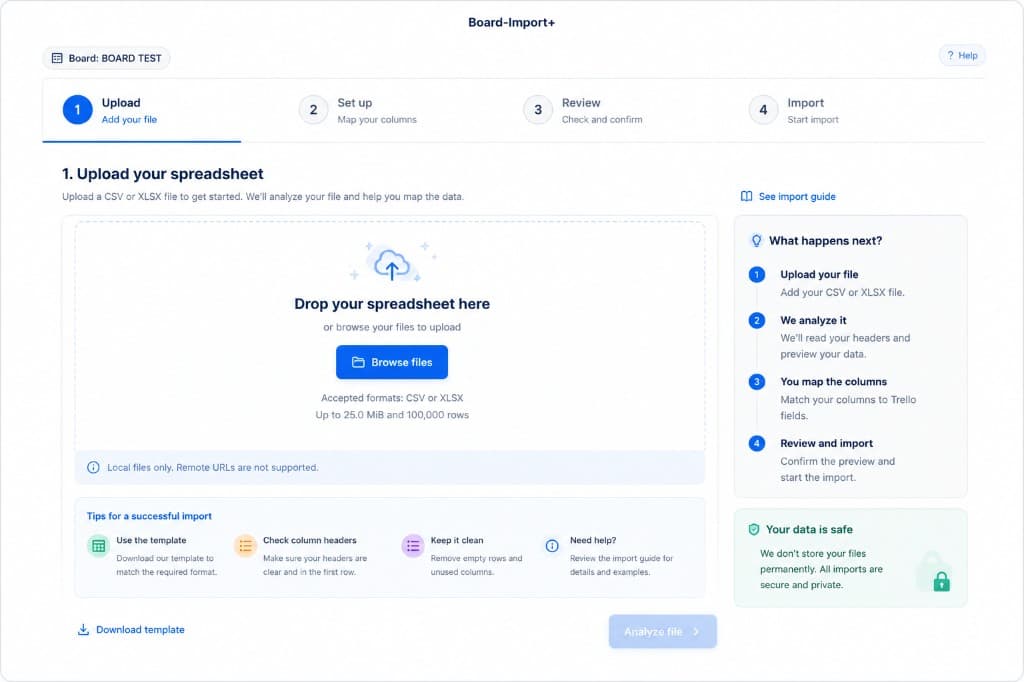
Board Import+ guides each import through file upload, Trello field mapping, row validation, and a final review.
Guided import
Review every mapping before import
Move through upload, field mapping, validation, and review in one guided flow before Board Import+ creates cards in bulk.
- Upload CSV or XLSX project data
- Map source columns to Trello fields
- Validate and review rows before import
Screenshots
Board Import+ in action
The import workflow keeps source columns and destination fields visible before any cards are created.
Use arrow keys to move between screenshots when a thumbnail is focused.
Capabilities
What Board Import+ helps teams do
Board Import+ turns spreadsheet rows into Trello cards through a guided upload, mapping, validation, and review workflow.
CSV and XLSX file support
Smart field mapping
Validation before import
Bulk card creation
Get started
Add Board Import+ to your boards
Install Board Import+ from Trello, then follow the import guide for supported file types and the review workflow.
Opens the official Trello Power-Up listing.
Related products